Open Source · APR 14, 2026 · 7 MIN READ
git-aftermerge: Teaching AI Agents to Learn From Their Merged Code
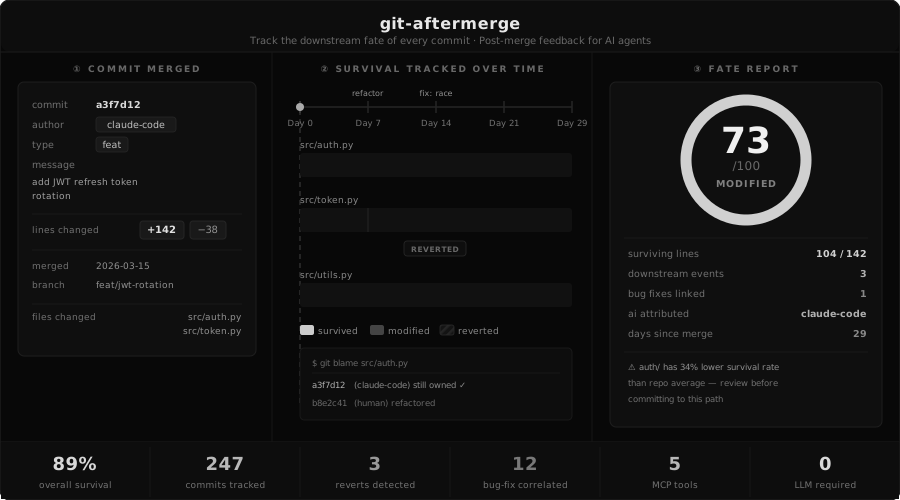
AI coding agents have no memory of whether their code survived. They write, they merge, they move on. A function they wrote six weeks ago may have been reverted within hours, rewritten twice, and associated with three bug-fix commits — but the agent has no idea. Today we are open-sourcing git-aftermerge, a Python CLI and MCP server that tracks the downstream fate of every commit and feeds structured post-merge feedback back to the agent. It is the missing feedback loop in agentic coding.
The Feedback Gap in Agentic Coding
Every coding agent workflow ends the same way: the PR merges, the agent closes the loop, and the consequences disappear into the void. If the code is reverted two days later because it broke a downstream service, the agent will not know. If the same file is patched five times in a month because the original abstraction was wrong, the agent will not know. The next task starts with the same context, the same blind spots, and the same probability of repeating the mistake. Humans learn from post-merge signal — agents are the only contributors currently writing with their eyes closed.
What git-aftermerge Does
git-aftermerge parses git history, runs git blame to track line-level survival, and computes a 0–100 survival score per commit. It detects reverts (both standard and manual), bug-fix correlations, and churn spikes. It then aggregates patterns by path, author, commit type, size, and language — surfacing which directories have the lowest survival rate, which recent commits triggered bug-fixes, and which areas of the codebase are genuinely risky.
| Step | What Happens | Why It Matters |
|---|---|---|
| Scan | Parse git log, run git blame per commit | Line-level survival data, not just commit metadata |
| Score | 0–100 per commit, penalties + bonuses | One number the agent can reason about |
| Detect | Reverts, bug-fix correlations, churn spikes | Finds failure patterns the agent never saw |
| Aggregate | Roll up by path, author, type, size, language | Answers "which areas are risky?" |
| Serve | CLI, JSON, markdown, or MCP tools | Drop-in for any agent stack |
The MCP Server: Direct Agent Feedback
git-aftermerge ships with a built-in MCP server that exposes five tools an agent can call directly: get_fate (fate of a specific commit), get_patterns (aggregate survival patterns), get_risky_areas (directories with lowest survival scores), get_recent_failures (reverts and bug-fix correlations), and get_context (markdown summary for injection). Add three lines to your Claude Desktop or Cursor MCP config and Claude can query its own historical track record before writing a single line of new code.
{
  "mcpServers": {
    "aftermerge": {
      "command": "git-aftermerge",
      "args": ["mcp-serve"],
      "cwd": "/path/to/your/repo"
    }
  }
}
CLAUDE.md Integration
The simplest integration path requires no MCP at all. Run git-aftermerge context --output .aftermerge/CONTEXT.md and reference it from your CLAUDE.md. The agent now starts every session with a summary of what survived, what failed, and which directories have historically been rewritten. This alone changes how the agent approaches refactoring — it becomes measurably more conservative in areas with low historical survival.
## Post-Merge Context
See .aftermerge/CONTEXT.md for code survival data and risky areas.
Why We Built It
Our Digital Employee agents ship code to production across multiple client projects. We noticed the same failure patterns recurring — the agent would rewrite the same brittle abstraction three times in a row because nothing connected its current task to the fate of its previous work. Post-merge signal exists in the git log. It just was not reaching the agent. git-aftermerge extracts that signal, scores it, and hands it back in a form the agent can actually use. It is the smallest possible intervention that turns an amnesiac contributor into one that learns.
Get Started
Install with pip install git-aftermerge. Run git-aftermerge init in any repo to start tracking. Run git-aftermerge report to see aggregate patterns. Run git-aftermerge fate <sha> to audit any commit. The CLI works standalone — the MCP server and CLAUDE.md integration are optional enhancements for agent workflows. Full source, tests, and documentation are on GitHub.
this note evidences a capability — AI-Native Solutions ↓